Internationalization And Localization
- Status:
Work in progress
Turbogears2 relies on Babel for i18n and l10n support. So if this document is not enough you will want to check their respective documentation:
Babel’s UserGuide
A quickstarted project comes fully i18n enabled so you should get started quickly.
If the quickstarted project includes a catalog for your browser language, its generated welcome page can be displayed in that language.
Language Auto-Select
Turbogears2 contains the logic to setup request’s language based on browser’s preferences(*).
[*] - Every modern browser sends a special header along with every web request which tells the server which language it would prefer to see in a response.
Language auto-select is controlled by i18n.enabled. It is enabled by
quickstarted/full-stack applications and disabled by minimal applications.
When it is enabled, TurboGears chooses languages in this order:
the language saved in the session by
tg.i18n.set_lang(),the browser’s
Accept-Languagevalues,i18n.lang, if configured.
So, while language detection is enabled, i18n.lang is a fallback
candidate. It is not a forced language and does not override the session or
browser preference.
The language in use during the request is available through the
tg.i18n.get_lang() function. This will report the currently
selected languages both in case of an auto-detected language preference
or in case of languages forced by the developer.
Languages returned by tg.i18n.get_lang() are ordered by
user preference. By default all the requested languages are returned,
if you want to get only the ones your application supports call
get_lang(all=False).
The current language in use is usually get_lang(all=False)[0].
Forcing a Language
Developers can force the currently used language for each request
using the tg.i18n.set_request_lang() function. This changes
the language only for the current request.
If you need to permanently change the language for the user
session duration, tg.i18n.set_lang() can be used.
If TurboGears session support is enabled it will store the
choosen language inside the session and recover it whenever
the user comes back on next request.
If language auto-select is disabled with i18n.enabled = false, the
request wrapper that reads the session and browser languages is not installed.
In that mode i18n.lang is the language used for each request, unless
application code calls tg.i18n.set_request_lang() or
tg.i18n.set_lang() during the request.
I18N Configuration
For a complete reference of all available i18n configuration options, see Internationalization.
i18n.langDefault:
None.With
i18n.enabled = true, this is appended after the browser languages and acts as a fallback. Withi18n.enabled = false, it is the fixed application language for each request. If no catalog exists for the chosen language, gettext returns the original string.i18n.enabledEnables the i18n request wrapper that reads the session language and the browser’s
Accept-Languageheader. Set it tofalseto disable automatic language detection.i18n.nativeSpace-separated list, or Python list, of languages the templates are already written in. These languages are treated as supported without requiring a
.mocatalog, and strings are returned unchanged.i18n.lang_session_keySession key read by the i18n request wrapper. The default is
tg_lang.set_lang()stores intotg_langunless the legacylang_session_keyconfig value is also set, so custom session keys should set both names if they rely onset_lang().i18n.no_session_touchAvoids marking a previously untouched session as accessed just because the i18n wrapper checked it for a saved language. The default is
false.localedirDirectory containing runtime gettext catalogs. It defaults to
[package]/i18nfor quickstarted applications. Runtime catalog files are loaded from[localedir]/[locale]/LC_MESSAGES/[package_name].mo.i18n.domain,i18n.locale_dir, andi18n.gettext_fallbackThese are not TurboGears runtime i18n options. Runtime translations use the configured application package name as the gettext domain and
localediras the catalog directory. The[tool.tg.devtools.i18n]section inpyproject.tomlconfigures thegearbox i18nBabel commands, not the request-time translator.
Making your code international
Whenever you write a message that has to displayed you must let TurboGears know that it has to be translated.
Even though TurboGears is able to automatically detect content inside tags and mark them for translation all the strings inside controllers must be explicitly marked as translated.
This can be achieved with the tg.i18n.ugettext() and
tg.i18n.lazy_ugettext() calls which are usually imported
with _ and l_ names:
from tg.i18n import ugettext as _

class RootController(BaseController):
    @expose('myproj.templates.index')
    def index(self):
        return dict(msg=_('Hello World'))
In the previous example the ‘Hello World’ string will be detect by TurboGears when collecting translatable text and will display in the browser language if a translation for that language is available.
While ugettext() works perfectly to translate
strings inside a request it does not allow translating strings outside a request.
This is due to the fact that TurboGears won’t know the browser language when
there isn’t a running request. To translate global variables, parameters
default values or any other string which is created outside a controller
method the lazy_ugettext method must be used:
from tg.i18n import lazy_ugettext as l_

class RootController(BaseController):
    @expose('myproj.templates.index')
    def index(self, msg=l_('Hello World')):
        return dict(msg=msg)
In this case the msg parameter is translated using lazy_ugettext()
as it is constructed at controller import time when no request is available.
This will create an object that will translate the given string only when
the string itself is displayed or evaluated.
Keep in mind that as the lazy string object built by lazy_ugettext() is
translated whenever the string is evaluated joining strings or editing it
will force the translation. So the resulting object must still be evaluated
only inside a request or it will always be translated to the default project
language only.
An i18n Quick Start
Quickstarted projects store their i18n defaults in pyproject.toml.
The [tool.tg.devtools.i18n] section configures the catalog domain,
locale directory, and generated POT file. The [tool.babel] section
contains the Babel extraction mappings that tell Babel which files should
be searched for translatable strings.
TurboGears uses Babel through the gearbox i18n command to extract
messages to a POT file in your project’s package i18n directory. Install the
generated project into the active environment before running gearbox i18n
commands so that the project-provided command is available:
python -m pip install -e .
Don’t forget to add the generated catalog files to your revision control system if you use one.
1. Extract all the translatable strings from your project’s files by using the following command:
gearbox i18n extract
This command will generate a “pot” file in the i18n folder of your application. This pot file is the reference file that serves for all the different translations.
2. Create a translation catalog for your language, let’s take ‘zh_tw’ for example:
gearbox i18n init -l zh_tw
3. Edit your language catalog in [package]/i18n/[locale]/LC_MESSAGES/[domain].po.
For example, a project whose package and catalog domain are both myproject
will create myproject/i18n/zh_tw/LC_MESSAGES/myproject.po.
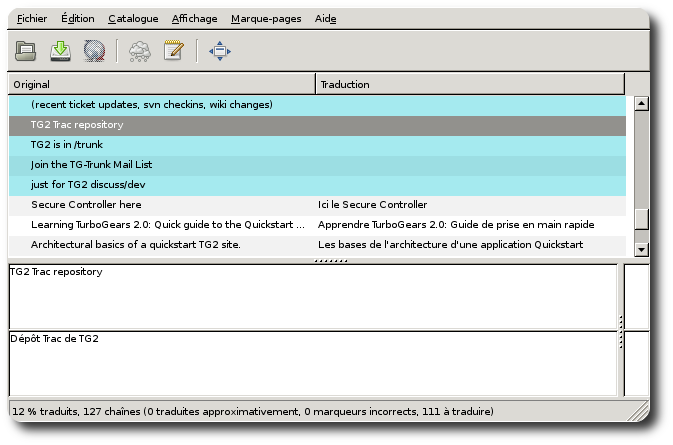
If you’re not an expert in i18n or if you would like to give the files to someone else so that he helps you we recommend that you use the really nice poedit program. This program works nicely on GNU/Linux and Windows and provides a nice user-interface to edit po files.
Compile your lang:
gearbox i18n compile
Configure the fallback language in
development.iniif you want one to be used when the browser or session does not select a supported language:[app:main] i18n.lang = zh_tw
To force that language for the whole application instead of using browser language negotiation, disable automatic detection too:
[app:main]
i18n.enabled = false
i18n.lang = zh_tw
Start server:
gearbox serve --reload
And see the local message show on the screen.
Commands
To fresh start a translation, you could use the following command to handle your locales:
Init Catalog
Create a catalog for a new locale with the following command:
gearbox i18n init -l [locale]
The locale could be es (Spanish), fr (French), zh_tw (Taiwan),
ja (Japanese), ru (Russian), or any other locale recognized by Babel.
Extract Messages
Extract all messages from the project with the following command:
gearbox i18n extract
Update Catalog
Update an existing catalog after extracting new messages with the following command:
gearbox i18n update -l [locale]
Compile Catalog
Compile catalogs with the following command:
gearbox i18n compile